I really like not thinking about systems. Systems that give me no reason whatsoever to think about them because they simply just work. They work whenever, whatever and however, no matter what happens. Systems that are so reliable you can only wonder how they do it, and something I’ve been wishing to build myself for quite some time.
When I started working on a small indexer as a means for learning C++, I couldn’t stop until this desire had been filled. And as I’m a student, eager to learn, I’ve decided to build the whole thing from scratch: not using any libraries (except 1), writing everything by hand, and coming up with my own solutions, instead of looking at how existing indexers solved my problems. Everything in this post is something I derived because the problem forced it.
This post will detail my journey, failed attempts, learnings and hiccups I encountered while building a crash-resistant, multi-threaded file indexer with a nested boolean query language in C++.
At first the scope of the project was very straightforward, without any of the fancy crash-resistant features: indexing files and searching them. Only having done some simple calculator programs in C++, without any low-level knowledge other than what bytes are, I started with my first prototype.
First Prototype
You could call my first approach pretty naive. I had yet to come across a project which required specific attention to how fast it’s able to perform. My experience consisted of small pet projects written in C# that didn’t have any real constraints to overcome or hard problems to solve.
So I went on head first: not knowing what monstrous, never-ending, ever-increasing complexity task was ahead of me, creating a first prototype.
But first: what did I even want to build? An indexer is a program that looks at (or indexes) various data sources to create a single “index”. This “index” consists of only snippets from the data it had indexed: allowing for very fast searches across the whole dataset, without the need to look at the data itself.
Let’s imagine that you like reading about nature books, and throughout the years you have accumulated a vast library of nature books, counted in the millions. You now come across a flower with the name “edelweiss”. You just know its name but have forgotten all of its other properties. Going through every single book would take some time. Instead you look at your index, search for the word “edelweiss”, and a list of all books that contain this word appears. This is called an inverted index and is core to this whole project and essentially to what I want to implement.
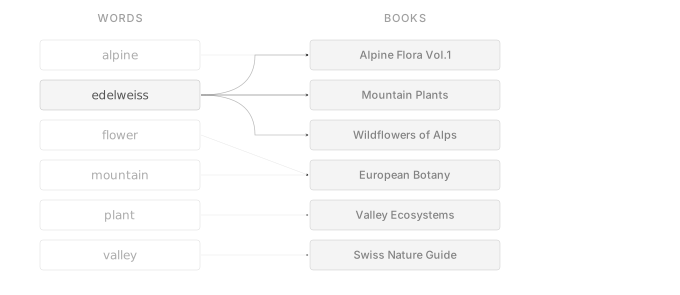
This is all you need to build an index and so did I. To keep it persistent I would have it saved on disk and to make my life easier I would memory map (for performance reasons: who would like to read a potential multi-gigabyte file into memory? And convenience reasons as I can just access it like an array) the files and read/write directly from it. To make search actually usable, the words are sorted alphabetically so a lookup system can be used.
It being alphabetically sorted, which is necessary for searching, means, however, that adding new words will be quite a challenge to get right as that would mean data needs to be shifted around to make space for new words at the correct location. Additionally, I treated the disk like memory: random access and writes everywhere and did that quite a lot of times, accumulating so much latency. It would have been faster to search all files directly instead of relying on the index.
I would when indexing new files,
- for every single file, read it and see what words it contains.
- go over the whole index on disk, comparing each word with the new ones and 3. if it already exists on disk, check if it referenced the disk 4. or if it didn’t exist yet on disk, make space for it and write it there directly.
You can probably see why it was so inefficient. Not only do I read the index front to back for every single file, I also insert directly there, which means the file needs to be resized, shift parts of it, and write the desired word to it. And when doing it with a few hundred files, the user could wait for quite some time, during which searching the index is not possible, blocking the user from using it and most importantly drawing the wrong kind of attention to it.
And adding crash resistance with this approach would be basically impossible, except doing a full backup of the files. However, before I decided to make it crash-resistant, I redesigned the whole index to make it faster, which in turn also led to the ground blocks being built for crash resistance.
When looking again at how my first prototype did this merge, the first thing that stands out is that the index is compared with one file only at a time, which results in reading the whole index fully for as many files as need to be added.
Instead of trying to fix that in the existing program, which worked for simple indexing and searching, as it was full of badly written code, big and small technical and architectural flaws (because I was learning C++ from scratch), I decided to toss it all in the trash and start over properly (or at least better).
Bottlenecks
Comparing multiple files at once
To compare multiple files at once with the on-disk index, we first need to understand what we even want to extract from those files to compare with. Because a file isn’t just a big list of words but rather a text with reoccurring words, words with slightly different endings, capitalisation, punctuation, some “preprocessing” will first need to be done. With the goal of an inverted index, it needs to be converted from a big pile of text to words linking to files. And to do that, the indexer would start by reading the full file front to back, char to char. During which a temporary string is built by appending every new char read. When the indexer comes across a delimiter like a dot or a comma, it adds that word to a list and continues with the next word.
When searching for e.g. “edelweiss”, you wouldn’t want to be bothered by not finding the correct files because you didn’t capitalise the “e” in “edelweiss”, but the book you’re after only has it at the start of a sentence and “Edelweiss” =/= “edelweiss” when looking at it in bytes. So the words are normalised. e.g. “Edelweiss” would become “edelweiss”. Everything is converted to lowercase. There’s also the possibility to do some more cool processing like removing common suffixes, so e.g. “plucking”, “plucked” all become “pluck”.[1] After doing this preprocessing, the result is a single list of all words found in a single file.
This is exactly how I did it with my prototype. Because the on-disk index is alphabetically sorted, that list of words will also be sorted so comparison can be done more easily by just using a simple list. So just having such a list for each file won’t work as that would then still end up going over the on-disk index multiple times. Combining them, however, is pretty easy by making it an inverted index, the same as the one on disk but now in memory. So this in memory index, which I call “local index”, is created. This local index will accumulate all changes first, and because it’s in memory it can be treated like memory and it will still be fast. At the end it will be compared with the on-disk index, which will still work by comparing all words like was done with a single list, and then using its referenced file to see if it is already linked on disk or needs to be newly linked.
The structure of the local index would then consist of two lists. In the first list, each entry has a word and then again a list. The second list contains all files in the local index. When new files are added to the local index, they are added at the bottom of the list. The word will be added at its correct alphabetical location, and in the list combined with it, the location of the file will be linked in the second list.
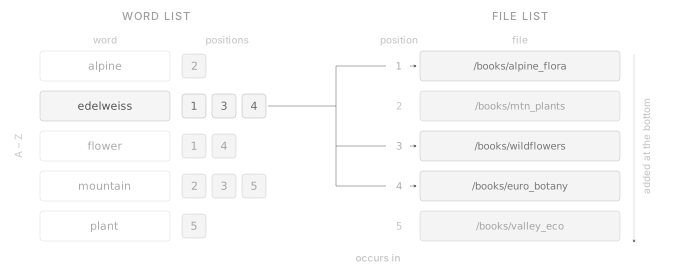
This allows all changes to be accumulated first in memory, reducing interactions with the file system and the slower disk speeds to when it’s only necessary.
Multi-threading
While disk speeds and latency were the biggest culprits of my prototype and reducing it to a minimum is the right way, it led me to almost believe the wrong thing: that physical storage mediums are always slow regardless of their application. So it didn’t even cross my mind for quite some time that multiple files could be indexed simultaneously as I had started believing that the disk would always be the bottleneck. The way I used it when merging new data is fundamentally different from reading files; one is reading and writing small parts of the file randomly all over the place thousands of times whereas the other is reading full files sequentially start to finish. Thus it took me quite some time to realise that now during indexing the biggest culprit was how fast this data could be processed into the local index. Here the limits of hardware are met as a processor can’t suddenly become more powerful. Unlike disks, however, multiple processors are at hand as almost every processor has multiple cores allowing the program to run in parallel. And because the hard work was already done without realising before by utilising a local index, each thread can be given its own local index and then at the end these can be combined together into one before combining again with the on-disk index. This means splitting the work between all of the threads. At the end a thread just needs a list of file paths so it can read and index them. And to make my life easier, I decided to create batches of files before giving them to the threads as creating a new thread for each file would be inefficient and I didn’t feel comfortable yet with sharing memory between threads.
Creating such batches requires first knowing which files should actually be indexed. Because not all files are of interest, like binary files or images or videos, as data can’t even be extracted from them, they need to first be filtered out. To do that, the program recursively looks through each file in a user’s specified folder and looks for files that end in .txt or .md. Paths that contain a “/.” are also left out as this marks hidden files like caches or non-important user data.
If the program were to now just let all hell loose indexing thousands of files, gigabytes of data and consuming all memory available, it would find itself killed by the kernel. Memory is scarce and it must be used consciously to support use-cases such as laptops. Therefore, all files there are can’t just be indexed and instead it is merged in steps as not to let the local index grow too big.
The easy solution and what I did is to add a memory limit that can be configured. The batch creation is then changed to only create as many batches as can be fit inside the mentioned limit. After those batches have been merged into the local index, it is merged with the on-disk index and the local index can therefore be cleared to be able to continue with the next batches.
This worked great for me. In fact, it did its job so well that it barely used memory at all, only indexing a few files each time barely progressing. Turns out that I used the file size of the files to see how many fit inside the limit and, not so surprisingly, it is very inaccurate. Because the file size and the size of how much data is actually used can’t be more different. When a file is indexed, a lot of data is stripped out and words are de-duplicated (a 10KB file with the same single word repeated a thousand times will end up using only 10 bytes) and if the file size were used, it would be overly over-estimating. Counting afterwards would solve the accuracy problem but ultimately would not work unless a lot of complexity were added as the threads don’t interact with each other and just work down their batch resulting in using more than the limit allows for.
Instead I chose to do both. Keep on over-estimating batches, but also counting the actual size afterwards. Then threads would keep being given new batches until the estimated batch size for one thread would, in addition to the total real size of the local index, be larger than the limit, and if not, new work would keep being given to threads.
And for very large files that are larger than the memory limit, the file will be read in batches as well, with a few hundred bytes overlap to not miss any cut-off word. And flush to disk each time. Because due to the nature of how merging works, it will only add new data and not remove existing ones.
Redesign
On-Disk Index
With all threads finished and all data combined into one local index, it is ready to be merged with the on-disk index. With how badly the merging performed in my prototype, this one also needed a lot of redesigning.
The on-disk index and the local index are very different and used for completely different purposes even though the underlying concept is the same. The local index exists for performance reasons; it exists entirely in memory to overcome the performance issues that come with the on-disk index that exists entirely on disk for persistence reasons.
This leads to two completely different designs, where the local index is kept very simple because it’s fast enough already with memory, where the other has to be built around the constraint that the physical disk is slow and its interaction has to be reduced as much as possible. Another important distinction is what it’s used for: the local index is mainly used to be merged with others and the on-disk index. The on-disk index, in addition to being merged, also needs to be searched and that needs to be fast because it is its entire reason to be used to begin with.
Dimensions also couldn’t be more different. With the local index, its size is limited because of memory consumption; with the on-disk index, millions of files must be supported with a very large index all while being very fast to search still. And because it’s an index, it should be relatively smaller than the files it has indexed or else its cost is too high for what it brings.
To sum up, the on-disk index needs to be:
- very fast to find what files contain a search word
- persistent
- low space usage
Laying it out on disk
The most obvious things to save are the words themselves as well as the paths they belong to. Like the local index, references are also used so there ends up being one list consisting only of words, one only with the words’ references and one only with the full paths.
In my prototype I saved them in the following 3 files:
- words.index
- paths.index
- reversed.index
Trying the obvious, I saved them as text files and used newlines to separate words and paths from each other as well as a comma between references of one file. The same line in words and reversed would then correspond to the same word, with line numbers in reversed pointing to the line in the paths index.
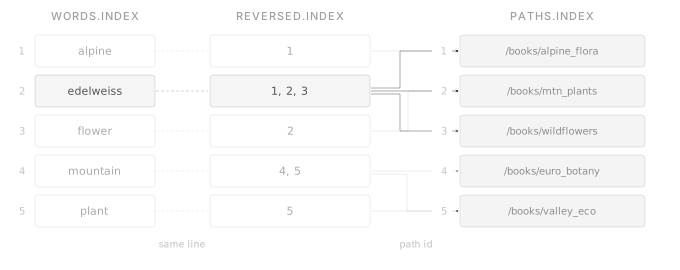
Searching would just mean finding the word, reading the same line in reversed.index and then resolving the line numbers in paths.index. Adding new data would be similarly trivial by just appending new paths to the end of paths.index (to keep existing references working), and inserting the word and therefore the reversed entry at the correct alphabetical location.
Sadly, the file system doesn’t have a way to tell where line X in file Y is. At the end of the day, I’m deep into binary territory without handy data structures that make my life easier. Reading line X therefore entails reading the whole file from the start and counting the newlines as they are encountered until the line has been found. This is extremely inefficient and a major reason why my prototype is so slow.
Likewise, inserting data at any given point in a file won’t just make that data appear there. Instead I must resize the whole file, shift a majority of the file back to make space for the new data. Additionally, often resizing means that the whole file is first copied to a new location as the old location had data right after it ended. This is something I’ve encountered during my prototype, but instead of solving the problem I fought the symptom by adding buffers at the end of the file, allowing me to resize without actually resizing. I still, however, shifted large parts of the file around and way too many times at that too.
Due to the way the index works, inserts can’t be fully ruled out. Instead they can be reduced to a minimum.
Knowing where what is
The first bottleneck can be summarised as unpredictability. It isn’t known what line is where in the file. For the words index this isn’t applicable as it needs to be read anyway to find words. In the case of references only specific lines are ever read, so if the process of finding the line could be sped up or made instant, it would be a massive speed up.
References are just numbers pointing to the line in the paths.index file. Computers store numbers as bytes, not as text files where each digit would be its own byte. One byte can hold values from 0 to 255, and 4 bytes up to 4294967295. If an upper limit is just set on the amount of files that can be added to the index, each reference can be made the same size as the other, allowing its location to be very easily calculated by doing reference_id * amount_of_bytes_per_reference.
This would make it predictable and would allow the location to just be calculated without ever needing to read a single byte. However, those are just single references; of interest are the references per word (or per line) and those are not fixed length (a word can have 1 reference whereas another will have 1 thousand).
Applying the same principle and just making the amount of references a fixed amount would make it predictable. But that would be too restricting or if enough headroom is added, way too much space consuming (if thousands of unused bytes are wasted for a word that only uses 2 bytes as references).
Keeping it dynamic means inserts still need to be done whenever a new reference is added.
But what if we could have something from both worlds? Using fixed-length blocks of references and dynamically chaining them together when needed. These blocks could then live anywhere. And like a chain, they are connected together.
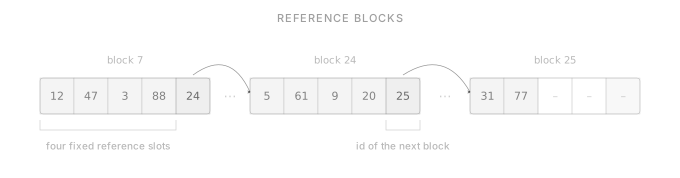
The way references are accessed is by looking at the same line (or now block number) as words, if new blocks are now added and chained together, all those chains would need to be shifted and corrected whenever a new word is added as it needs to be in the correct location.
Performance and storage efficiency also won’t go hand in hand like that, if the blocks are made too large, a lot of space would be wasted (a lot of words may only have 1-2 references); make them too small and it will end up jumping all over the index which will result in a performance drop (because reading data sequentially, which large blocks entails, means faster performance).
Additionals
Again, to enjoy the benefit of both worlds, I just made the reversed index constant size with the option for 4 references. This way its exact location can be calculated. If a word ever needs more references an extra field at the end of the block is kept reserved. This extra field contains an id, the additional_id, which links to a block on a brand new file, the additional index. This additional index is essentially the reversed index but the blocks here are larger with more space and they also contain an extra field to link another additional id for chaining.
This way, this approach keeps the link between line number and block number in words and reversed, but also gains the benefits of a chained, larger block, additional index and the benefit of a smaller block reversed index to both allow for words with only a handful of references and words with thousands of them. New words would just mean a new insert in the reversed index while keeping additional untouched.
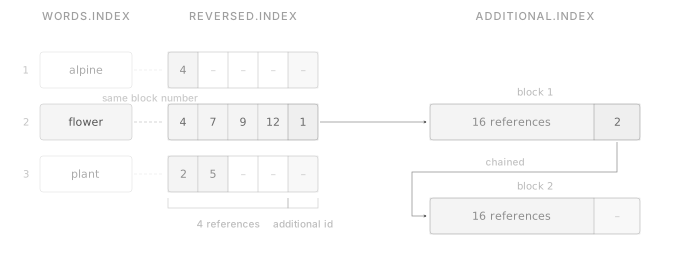
One trade-off is still left, however. Inserting new words would mean inserting new blocks in reversed. Words suffer from the same problem, however, and there they are required to be alphabetically sorted. So this is something that needs to be accepted to a limited degree, that insertions can not be fully removed. But at least with additional it isn’t as glaring as it was before.
Words
Unlike references, the words index is read and compared manually, so predictability is not a problem here. Remembering back to why multi-threading was used is that the processor couldn’t keep up, not the disk. The same applies to comparing in the words index, whether it is just searching for one word, or comparing a thousand-word local index.
When comparing, the search starts at the start of the index and works its way through it, comparing word for word, character for character. Whenever the program knows it has its word or not, it does something or it keeps on reading and comparing until it has found the newline that tells it a new word begins. And considering that it may already know it isn’t the word it’s after, after the first character, it leaves a lot of performance on the table if it could not somehow skip the comparing.
Faster traversing
But knowing where to skip to would mean the program would know how long the word is. Saving that in addition to the newline would work, but also means more space wasted. But this is binary territory now, newlines exist only so a human can read it better. No human reads the index. And using a length indicator as a separator would work just as well. And as most (if not all) words are no longer than 255 chars, a one byte length indicator can just be used which is the same size as a newline.
Now the program just needs to count the amount of chars it has encountered for a word and compare with its size so it knows when the next word starts and it treats the next byte as a number instead of a char or it skips directly to it when it is certain it is not its word. This means less data that the cpu needs to process and compare and faster comparison for the program.
Note: I use memory mapping to map the index files instead of directly reading them. This has multiple benefits: 1) it’s faster 2) a part of the file is already loaded into memory 3) it can be interacted with however needed just like with a string, binary data, an array etc. while the library handles reading and writing to the index files. By doing that if the program is reading the word separator of a word, the memory mapping library will go and already load parts of the file surrounding the part it accesses into memory, this means it’s already faster to go to the next word. But there’s also no need to care about random io and high latency access times from the ssd/hdd. It won’t negatively impact performance by skipping around or comparing char for char, it will even speed up the jumping around because it always loads the surrounding parts of the file into memory as well, making efficient use of the physical storage mediums available.
Jump around even more
Even with this optimisation, the whole index would still need to be read, front to back, just to find one word that happens to start with z. It would have been way more efficient to start comparing where the letter z began. Luckily this problem is pretty widespread in the real world as well. You don’t go and read a whole dictionary just to find one word; you use the thumb index and jump to the correct pages, reducing the amount of pages you read and compare.
And this translates 1:1 to here as well. A small index can be used, consisting of the alphabet (a-z) where each character points to a location and an id in the words index, where the first word appears with the given first character.
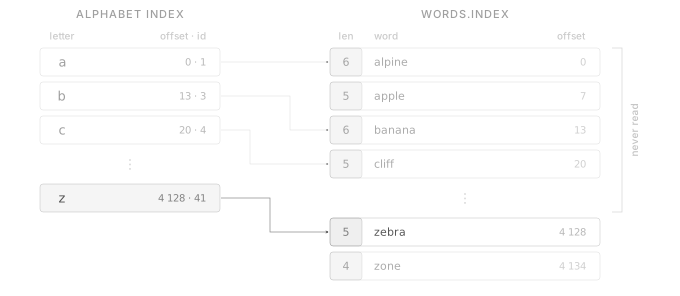
Instead of starting at the front now, the search can just consult the index for the letter z, which tells it exactly where it is, making it just read a small portion instead of the whole index. Speeding things up dramatically. I’ve seen a ~2.6x performance difference during the word comparison part in my tests, possibly even more on larger indexes, when searching for a few words using the index.[2]
The consequence of having another index for the index is that, well, it needs to be kept updated especially when new words are inserted. But it’s well worth it. I also went down a dead end trying to squeeze the words themselves into fewer bits: see Overoptimising.
Merging
Having a local index ready to be added to the new and fancy on-disk index, it is finally time to start thinking about how those are merged.
With an empty on-disk index, this isn’t too hard. But merging it to an existing on-disk index proves to be a lot more difficult. A lot can go wrong when the merge needs to insert new words, make space, update references or add new additional blocks. If during any of those steps something goes wrong, the whole index will be unusable without any way to recover, except for a slow full re-index.
This would definitely make the program noticeable to the user which is something I really don’t like. The program should never give any reasons to be noticed. And to prevent that from happening, the merging needs to be bulletproof so that it can never fail.
Yes, the index doesn’t store any critical user data and everything can be regenerated from the actual files, and the use case of the program is just to allow faster searches. However, considering that an index might consist of millions of files, this would mean regenerating can take quite some time during which no searches can be made. And it not being confined to environments with a stable power supply means that the program can be stopped at any time, be it out of battery on a laptop or a power outage on a pc. That’s why I decided to make it crash-resistant.
One way to make it survivable is to just create a backup before merging that can be restored if something goes wrong. Searches continue to be possible during the whole merge as it can just read the backup. However, it does use twice the storage space and especially in a larger index this can become unacceptable.
Ideally a full backup wouldn’t be created and ideally there’d be the least downtime possible. One of the biggest bottlenecks still not fully resolved is the inserts. They were reduced to a minimum but they still happen for the words and reversed index for each new word.
The main problem with inserts is that the file needs to be resized and data shifted around to make space for it which is pretty expensive.
But as we’ve come to realise, completely ruling out insertions isn’t possible. One thing that is now possible which it wasn’t before is doing the shifting operation only once because of the local index. In my prototype I did an insertion and shifting every time I came across a new word, but now all the new words of all the files are already known because of the local index.
The same thing can be applied to the rest of the changes: batching them and applying them once. Reducing disk operations to a minimum. And to do such a thing the merge first needs to calculate every operation it will do and create a plan so it can during the last step just execute it which will minimise downtime.
The cool thing about a (good) plan is that everyone can follow it, even those who didn’t write it. A (good) plan also means that each step can be executed by any person, even those who haven’t written it or completed any previous steps. This means that everyone can start or resume an unfinished plan without even having any knowledge about a plan. And if each step is written down in a way that allows it to be redone even if someone else stopped in the middle of executing it, it would mean the plan can recover from crashes and just be resumed. Making it crash-resistant and exactly what is wanted.
This plan, I called a transaction list, which contains all changes in steps written to disk which can be executed and resumed.
Creating a plan
Figuring out what changed is the first step in creating such a plan. There are two types of changes the index can have, (a) whether a new word has been added or (b) if an existing word has any new references.
Thanks to the alphabetical sorting of the words index and the local index comparing the words is pretty straightforward. The comparison begins by looking at the first word in the local index and its first char. If it would be different from the first char of the current on-disk word (which at the start is always a), the word jumping table would be utilised to jump to the correct starting position on the on-disk index.
The comparison begins to read the word length indicator of the first word on the on-disk index. If the length differs from the local index word, the possibility of it being the same word can already be ruled out. The only thing still left to know before jumping to the next word is if the on-disk word would come before or after the local index word when sorted alphabetically, which can easily be found out by continuing to compare chars until the words don’t share the same char any more.
The on-disk word being bigger than the local index word (which would mean if the first non-same character is bigger like z is bigger than a) would mean that the local index word must come before that word in an alphabetical ordering so it needs to be inserted at this position (edelstein would come before edelweiss because the s is smaller than a w). If the local index word is bigger, the comparison will continue with the next on-disk word until the on-disk word would be bigger.
If they are the same length, the comparison will do the same as before but when every char is compared and they are all the same, it is certain it’s the same word.
Updating word jumping table
The word jumping table also needs to be kept correct because each insert would shift every subsequent character back. This is done by keeping track of each insertion and increasing the start id and location of every subsequent character by one and by the length of the word just inserted.
References
For existing words, the merge also needs to make sure new references are added. References are the ids of the paths in the index, but the local and on-disk indexes don’t share the same path ids for the same files. The merge needs to first create a translation table between the path ids of both indexes so they can actually be compared. Any paths that don’t already yet exist on the on-disk index will also need to be added first to it.
To now see which references are new and which one already exists on the on-disk index, the merge can remove all the references from the local index that already exist for the word in the on-disk index. The references remaining are the ones that need to be added.
To add them, the merge first checks the reversed block and all connected additional blocks if they exist for any unused slot and fills them up with the new references. If all slots have been used, the merge will just create new additional blocks and chain them together until all new references have been added.
The merge keeps track of all those writes in a temporary list before they are written to the transaction list later.
New words require the merge to insert a new reversed block at the right location and if needed, create additional blocks. The merge keeps track of the insertions in another temporary list and adds any additional blocks to the write list as they don’t require any inserts.
Calculating changes
We now know exactly where new words and reversed blocks need to be inserted, where to overwrite unused reference-slots and how to chain together new additional blocks.
The first thing done is calculating the new file sizes for the index files. That can be done by just counting together the length of all new words, or how many reversed blocks are added and how many new additional blocks are appended. Then, the first transactions (or steps) are added to the transaction list which will resize all index files.
In the paths index only new paths are added, so one new transaction can be added to the list which will write all the new paths at the end of the file.
The same is done for new additional blocks, creating one transaction that writes all the new blocks at the end of the additional file. In addition, new transactions will also be created for any slot or reference overwritten.
Those transactions will be all of one type: write. However, the one unresolved problem is the inserts and how to make them (reasonably) fast.
Insert problem
At the end of the day, everything comes down to bytes. Every file, every text, every number consists of one or multiple bytes. And the computer provides those bytes as one long list of bytes. Reading from and writing to it is very simple. Inserting on the other hand isn’t. If an insert is made into a file, basically two things happen:
• First, the file is resized to make space for what is to be inserted, as not to overwrite existing data.
• Second, after a resize there will be some (or exactly by how much got resized) empty space at the end of the file. However, usually the insert isn’t wanted only at the end of the file. Therefore space needs to be made for it by shifting all the data from the starting point where the insert is actually wanted by exactly how much is to be inserted. The empty space is now exactly where the data can now be written and not at the end of the file.
Let’s make an example: say there is a 10 byte file and a 5 byte word needs to be inserted exactly in the middle. The file will first be resized by 5 additional bytes. Now there is a 15 byte file, with the first 10 bytes with actual data and the remaining 5 bytes with zeros.
There are now 5 bytes of empty space at the end; it is wanted, however, in the middle. To do that the data will be moved from location 5 (the middle) to 9 to location 10 to 14. In the transaction file this exact operation will have its own transaction type (next to write and resize), with just a few parameters: where to start shifting from (where the data is to be inserted) and by how much (the length of the insert data).
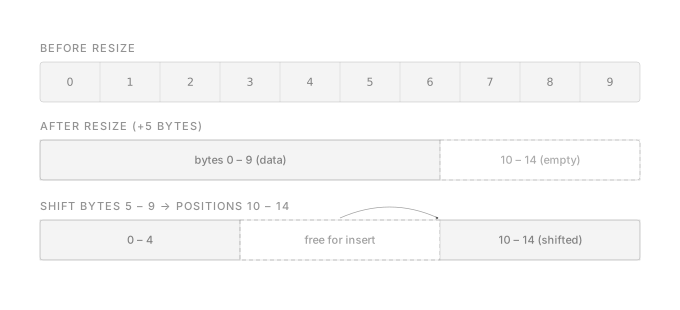
In this example, the transaction is also crash-resistant. It can be redone even if it wasn’t finished. But, if the insert had instead been at position 3 instead of 5, data would need to be moved from location 3 to 9 to location 8 to 14. Unlike before, those two ranges now overlap. If anything would happen during the transaction, it can’t just be repeated because the source data overwrites the destination.
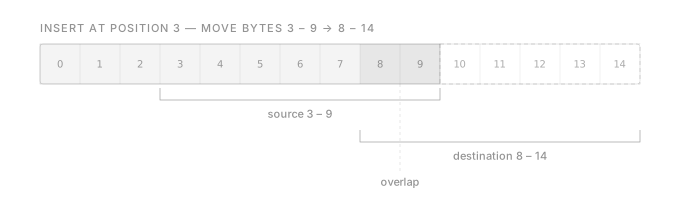
To make it crash-resistant, backups need to be created when the data to shift will overlap with itself.
Let’s take a look at another example where 3 insertions will be done at different locations.
If the first insertion were started with, all the data would need to first be moved from the insertion point by the amount of the first insertion. This essentially means also shifting back data that will later be shifted around again. This was the biggest slowdown in my prototype by a wide margin. Because all the insert locations are already known, a system could be created that would only move data once.
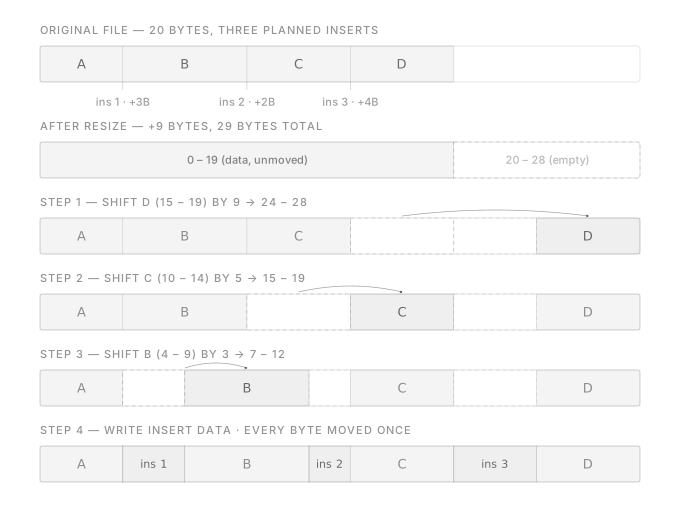
And to do that, they need to be inserted backwards. Start with the last one and end with the first one. To start with the last insertion, which would move the data from its insertion point to the end of the file, it needs to be known by how much it needs to move. Because it’s now not just by how much data the last insertion would actually insert, but it’s also how much data all the other inserts insert together. The next insertion would then move also by how much all other inserts move minus the one before and its own insert data. At the end, all insertions will have been completed while a single byte will have moved just once.
Now that where and how much to insert efficiently is known, transaction items are created. First, data is moved so space is made for insertions by doing it backwards back to front. For the ones that overlap with their own data, a transaction of operation type backup is first added, that will back up the part that gets overwritten and then after the transaction for moving, but with the backup id header linked.
After doing all that, the data from the insertions is now written to fill up the space just made for them. All while having data integrity guaranteed even if it would crash. The same exact thing is done for the reversed index.
Executing the plan
The planned out transaction list is written to disk and is now ready to be executed.
It starts with the first transaction. Each transaction has its own header. In that header there is a status field that can either be 0 to mark that the transaction hasn’t been started yet, a 1 for it being currently in progress and a 2 for it being completed. The first transaction is marked as in progress.
It is important that the system knows exactly where the transaction has been left off after a crash. Because the next transaction might overwrite data that the previous transaction needed or will overwrite. If a transaction is rerun even though the next one has already been started, there is a risk of data corruption. That’s why a file system sync of the transaction file is done after every transaction update which will force the system to write it to disk.
After completing the transaction, it will be marked as completed. Before that, the actual index files will first be fsynced. If the transaction file were fsynced first and a crash occurred before the index file is synced, a transaction which has not been saved would not be retried because the transaction was marked as done.
After some time, lots of small write transactions are now being executed. Doing an fsync multiple times every single transaction for a few bytes changed does have a pretty big performance penalty. Luckily, the write operation, which is the most common one, is also the one that by design will never interfere with other write operations. They could be reshuffled and the outcome would be the same. To speed things up, an fsync will only be done if the next operation is not a write transaction or after a few thousand write transactions.
And for all other types, an fsync is still done every time.
Finally, Searching
At this point I had been working on this project for almost a year, during which I’ve never implemented proper search. Just a very simple word input that would search the index, find its references and translate them to paths and output them. By default multi-word searches are OR searches meaning any path that contains any of those words will return. But this is kinda boring and useless for more advanced searches. So I’ve decided to add AND and NOT operators as well. And because I really like brackets in maths and coding, I’ve decided to add them as well. This is what a query could look like:
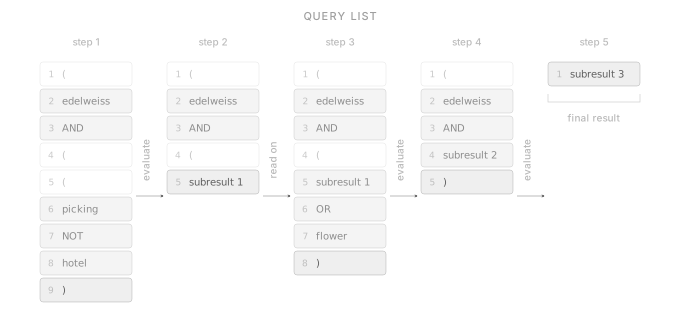
(Edelweiss AND ((picking NOT hotel) OR flower))
picking NOT hotel being evaluated first resulting in all paths that contain the word picking but not the word hotel, its result will then be compared against flower. Here it will result in all paths that contain either the result of the first bracket (picking but not hotel) or the word flower. Lastly its result will be compared to the word edelweiss, meaning the only paths that were true for the last two brackets but also contain the word edelweiss will return.
To process this query, the indexer will first just look at all the words and extract them into an alphabetically sorted list which will then be used to search against the on-disk index. The indexer now knows exactly which paths are connected to which words.
To now actually evaluate against those sub-results the query needs to be converted into a format that the program can work against. This is done by starting to build a list with fixed entries called the query list.
The list for this example would look like this:
1. (
2. edelweiss
3. AND
4. (
5. (
6. picking
7. NOT
8. hotel
9. )
Whereas the words are references to the path results from the previous search. You may see that not all of the content from the actual query has been added. Because as soon as a closing bracket is encountered the indexer starts evaluating the content of the query.
Here the indexer would go back to the last opening bracket which would be at position 5. It then continues working its way to the end. First it loads picking into its working list, next it sees the operator NOT, which translates into an AND NOT which it will keep in mind, and lastly the word hotel. It then removes any paths from its working list (which are the results from the word picking) and removes any paths that are present in both this one and the results for the word hotel. Those resulting paths will be saved in a new list called the sub-result list. In the query list, the indexer will then remove the items from the closing bracket until the corresponding opening bracket and replace it with a link to the sub-result list.
1. (
2. edelweiss
3. AND
4. (
5. subresult1
The indexer then continues with adding the next items from the query until it comes to the next closing bracket, doing the same thing from its corresponding brackets and replacing it with sub-results. At the end, there will be just one entry left in the whole list which will point to a sub-result entry which is now the final result.
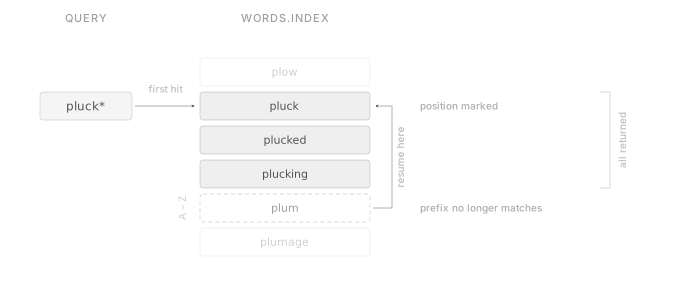
Another thing I have implemented is wildcard matches. Normally you’d also like to find partial matches for words (e.g. you enter pluck, but results from the word plucking will appear too). Wildcard searches would allow for that by essentially doing a “pluck*” search.
Luckily this wasn’t too hard to implement. In the word comparison part, instead of stopping when the indexer has found the word or has gone past it, it would mark its position and continue looking until a word appears that doesn’t begin with the search word. Since the indexer might have skipped over consequent search words by going farther than what alphabetical sorting might allow, it needs to return to the location of the exact match and continue with the next search words.
Conclusion
Everything in this project came back to one thing: random writes and reads on disk being slow. My first prototype ignored it and resulted in it being slower than just searching all files directly.
The local index exists so it can write to disk in batches and not for every file. Fixed-size blocks exist so it can calculate where something is instead of searching for it. Additional exists so these blocks can grow and to prevent a lot more insertions and reshifting. The word jumping table exists so it doesn’t read the whole index for a word that is blatantly at the end of it. The transaction list exists to prevent index corruption. And inserting backwards exists so a byte only ever moves once.
Everything came from the simple fact that random access on disk is slow.
Also please take the crash resistance with a grain of salt. I did test it manually myself, but I have no real testing system in place that would actually test it under real circumstances.
Obviously my solutions aren’t perfect. I rediscovered solutions to problems that have been solved for decades. But I rediscovered them myself, without any help or copying from other projects which made me learn a lot.
You can find the final project here: github.com/lhilfiker/filesystem-full-text-search-indexer
Appendixes
Customising them
As you might have seen, I use a lot of 4-byte, 8-byte values for certain things, or a 2-byte separator for paths and only 1-byte for words. Those are all the default values I’ve found to be a good balance between storage efficiency and allowing quite some large indexes. However, some might need to save words longer than 256 (the max value 1 byte can hold), or have more than 65536 (max value for 2 bytes) paths, that would cause problems because the path ids reference is 2 bytes by default. If that is exceeded, files can’t be referenced anymore without double referencing some. And because my goal is to support indexes with millions of files, I also added support to customise almost all of those values.
I did that by allowing a build-time config option to be set. Because it’s build-time configured, it can’t just be changed whenever wanted. However, I haven’t found a better way to support it, because I rely a lot on structs and other data formats that are configured at compile time with no real way to make it runtime configurable except to have a lot of duplicate code and a lot of added complexity. Instead, I now use the configured values at build time to indicate all of the things. ↩︎
Overoptimising
The words are saved normally. Earlier I tried to make it more efficient, because initially I planned on just allowing lowercase a-z chars to be added, those don’t need a full byte on their own, and a-z also fits in just 5 bits. That’s a 3-bit save per character. However, I needed to revert my plans shortly after because it’s just not feasible. CPUs are optimised for 8 bits only and it’s very hard or nearly impossible to read it in 5 bits. It would have required some very hacky hack to even use it and would have made it a lot more complicated than it already is. Therefore, I decided to just use 1 byte per char but then also allow using more than just lowercase a-z (this will first need changes to words_f to even support it). ↩︎
1. word stemming: (I had to remove this feature from my program because the library I used produced inconsistent results and wasn’t as fast as I hoped for, so I removed it for the time being.) ↩︎
2. I tested the program once with the word jumping table there and once removed. I also added some time counters. I tested both on warm caches. The index was created from a Gutenberg English book dataset of ~1.7GB. The index had 476388 unique words, and 3210 files connected. I ran a simple OR search with 8 words, each with a different starting letter. The search loop took 2.54ms without the word jumping table, and 0.974ms with it. The total execution time was 6ms and 8ms for the one that had it removed. About 25% speed difference in total. Tested on a laptop with an NVMe drive. ↩︎